The Reimbursement Claim Form should be submitted within 10 days for domestic travel and 14 days for international travel after completion of the conference/class regardless of whether out-of-pocket expenses are expended.
A claim form is required for ALL conferences regardless if not claiming a reimbursement
Example: You attended a virtual conference and District paid for your registration. You have zero out-of-pocket expenses. You must still submit a Reimbursement Claim Form to file a $0 claim. Include the copy of the registration payment provided by District. This will allow District Travel to close our your CAR.
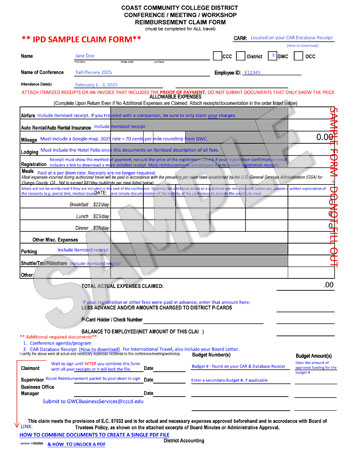
CCCD Reimbursement Claim Form [PDF]- For IPD reimbursement claims. Save to your computer to access the fillable features. Save the complete form to your computer and combine it with your receipts first before you sign it. Once signed, the PDF will lock and cannot be combined with other documents.
CCCD Travel & Conference Expense & Reimbursement Guide - Please review prior to completing the reimbursement form. This provides comprehensive information on allowable expenses and important guidelines.
How to complete Reimbursement Claim – important tips!
IMPORTANT: When submitting receipts for conference travel reimbursement, it is crucial to ensure that every receipt clearly displays the method of payment used for the purchase; if a receipt does not show how you paid, it will not be accepted by Business Services and you will be asked to resubmit a valid receipt.
REIMBURSEMENT PROCESS:
- Complete the Reimbursement Claim Form.
- DO NOT SIGN it yet until after you have combined it with your receipts and other documents to create a single PDF file.
- Include your CAR signed by college president AND your Database Receipt
- Both documents were previously provided to you by the IPD Office. Please check your inbox for an email from Patty Fonseca containing these attachments. If you're unable to locate the message, feel free to reach out to Patty for another copy.
- The Database Receipt contains your CAR# (aka Control#) and the Budget # needed to complete your claim form.
- For International Travel
- Contact the IPD Office to request a copy of your District board agenda approval document
- Include ITEMIZED receipts
Please keep in mind that Business Services processes a large volume of documents. To streamline their review process and to prevent delays of your claim, we recommend adding notes to your receipts that highlights any key details associated with your claim.
Receipts must be itemized and include the payment transaction. Include receipts in the order listed on the reimbursement form. If your receipt only documents the price, search your records for a receipt that displays that your payment was processed. Contact Business Services for assistance with alternative documentation if you are unable to find a valid receipt.
- Airfare - If you traveled with a companion, be sure to deduct their portion from the total amount you are claiming.
- Auto Rental and Insurance
- Mileage - NEW: must include TWO Google maps = 1. Home to GWC and 2. Home to conference. Reimbursement will be the difference, if there is one. *If travel occurred during a non-duty day or if exclusively working from home, submit one map from Home to the conference and must include a note explaining this in the comments section on the claim form.
- Lodging - must include the hotel folio receipt since this includes an itemized description of all fees.
- Registration fee - be sure your receipt includes the method of payment. Most reimbursements are delayed due to employees failing to provide a valid receipt that documents the ACTUAL payment method; not just showing the price of the registration fee. Check if your registration confirmation email includes a link to download a more detailed receipt.
- Meals - All meals will be reimbursed at a per diem rate. Receipts are no longer required. If meals are included in the cost of the conference (Business Services will check the conference program), expenses for additional meals or a substitution are not allowable, unless you provide a written explanation of the necessity to do so (e.g. special diet, medical issues) and documentation of the inability of the conference to provide the substitute meal.
- Parking - If parking was included in your hotel folio, list the parking fees in the parking section and substract that amount from the hotel fees to avoid a duplicate claim.
- Shuttle/Taxi/Rideshare - Tips are permitted up to 15% and must be listed on the receipt.
- Other
- Conference Agenda or Program
- Include the conference agenda or program in your reimbursement packet. This documentation helps verify the event details and streamlines the review process.
- Create a Single PDF file.
- Combine all documents to create a single PDF (refer below for assistance with this process).
- Save your file using the Business Services naming convention:
"LastName, FirstName_CAR#_____-Travel Claim"
- Sign the Reimbursement form
- Sign under Claimant and save file.
- Route the Reimbursement packet for Dean signature
- Your Division Office will return your claim packet to you once signed.
- Submit your Reimbursement packet
- Email the completed reimbursement packet to GWCBusinessService@cccd.edu
- Their team will notify you when the check is ready to pick up.
- Reimbursements take approximately 3 - 4 weeks to process.
- If you have not received your reimbursement within the expected timeframe, please contact Business Services to inquire the the status.
How to combine CAR documents to a single PDF file (LINK)
Protected files
If your reimbursement form is signed, it may have been converted to a protected file, preventing you from combining it with your receipts.